The Difference Between a Secure Browser and a VPN

NOID Editorial Team
Publisher
Date
04/06/2026
Date
04/06/2026
"I bought a VPN, so I'm protected now." This is the most expensive illusion in consumer privacy: people pay for a network-level tool and expect browser-level protection from it. Those are different floors of the same building, and tracking has long lived on both.
To pick the right tool, you only need to understand what happens where.
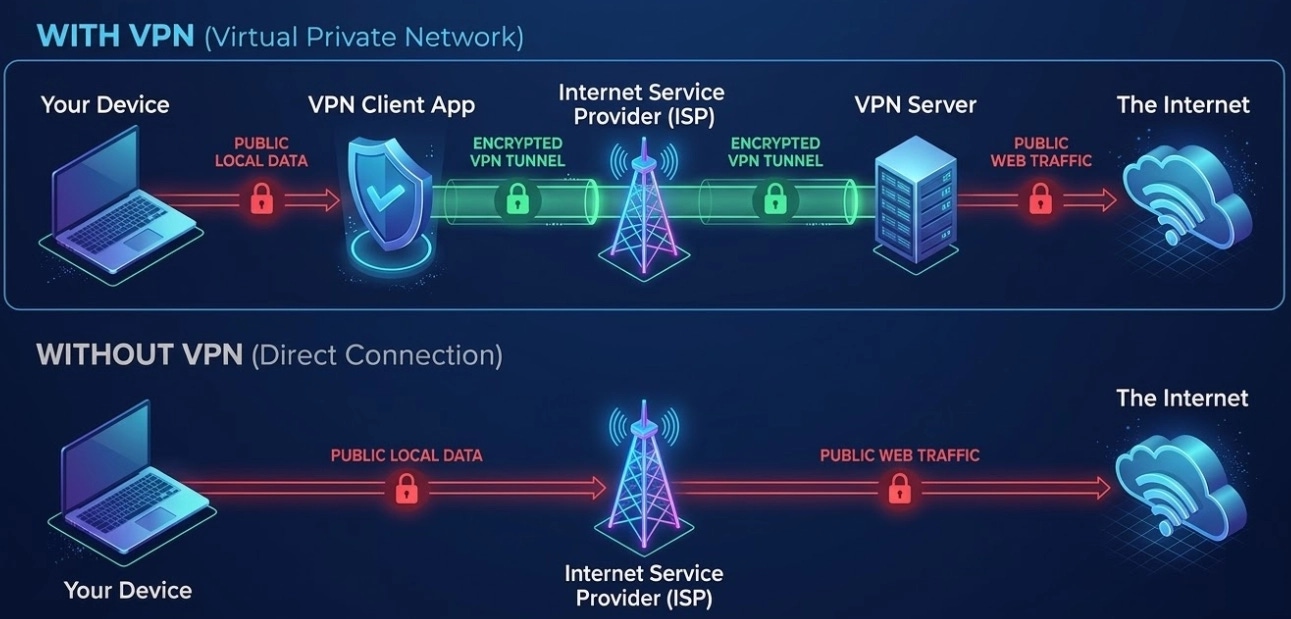
Floor one: the network. This is where a VPN works
A VPN builds an encrypted tunnel between your device and its server. Your ISP sees that you're connected to a VPN but can't read the traffic. Websites see the server's IP instead of yours. The trust model matters here: EFF recommends judging a VPN by transparency, business model, data collection, and encryption quality, not by a promise of total protection.
On this floor, a VPN earns its keep: public Wi-Fi, untrusted networks, keeping your ISP from logging which domains you visit. And on this floor its authority ends. Past that point the browser takes over, and a VPN technically cannot reach into it — it has no access to the page rendering engine.
Floor two: the browser. A VPN can't reach here
A regular browser is one environment for your entire digital life: one history, one store of cookies, LocalStorage and cache, one stable device fingerprint (language, timezone, screen, fonts, Canvas, WebGL). Everything you do accumulates in a single profile and merges into a single picture.
That's why the classic tracking chain keeps working. You log into your email — the session and cookies are recorded. You switch on a VPN and open another site — its ad scripts collect the same fingerprint and the same identifiers, and calmly continue building your profile. The IP changed; the person didn't. The mechanics are covered in What Are Browser Digital Fingerprints.
A secure browser works on this floor. Its job is separating environments instead of hiding the channel: isolated profiles with their own cookies, storage, and history, plus consistent fingerprint parameters for each profile so sessions can't be stitched together.
An honest comparison
The takeaway from the table is simple: these are not competitors. A VPN versus a secure browser is a lock on the front door versus separate rooms in the apartment. You can use both. You cannot replace one with the other.
How this works in NOID
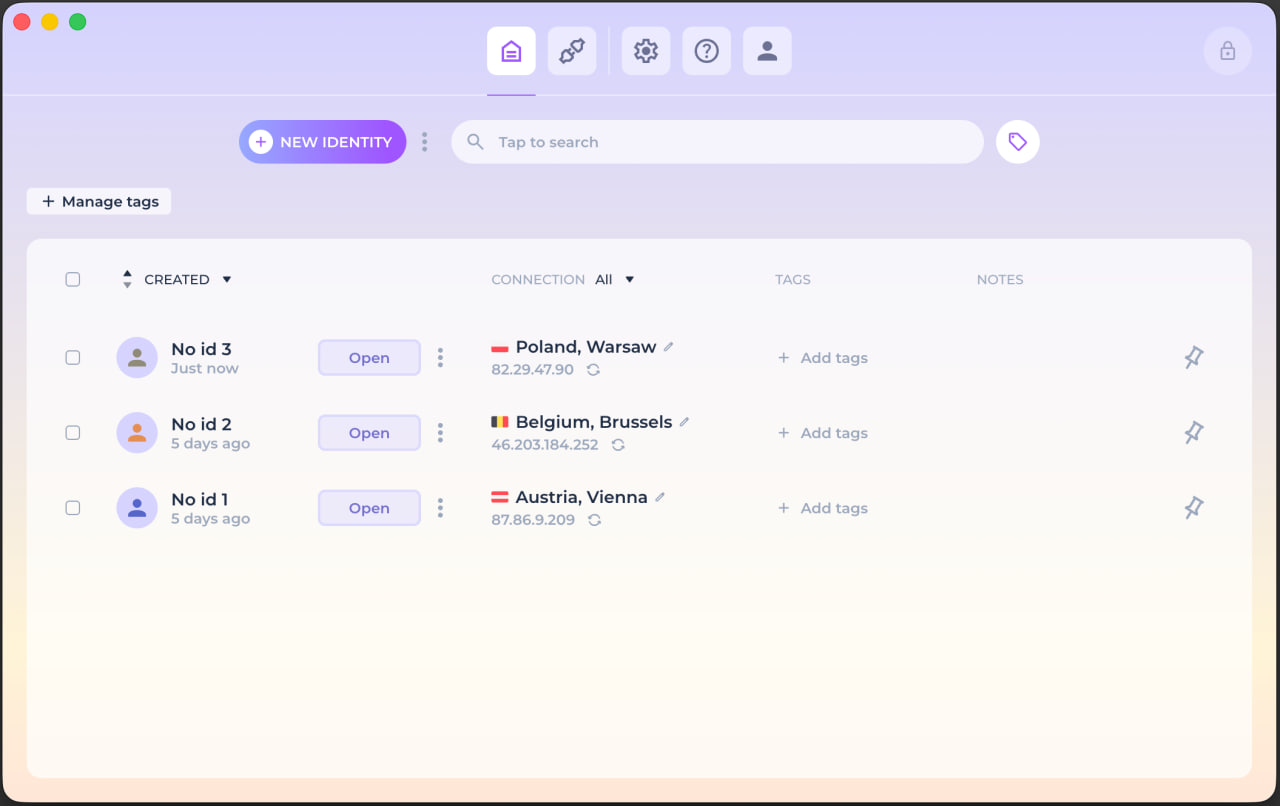
NOID is a second-floor browser. Each identity in it is a separate environment: its own cookies, storage, history, consistent fingerprint parameters, and connection context. Profile data is stored locally and encrypted rather than in the service's cloud; disposable identities cover one-off tasks.
One piece of honesty matters here: neither NOID nor any other tool makes your behavior anonymous. Log into a personal account from an "isolated" profile, and the isolation is over. The tool separates environments — the discipline is yours.
To see what a website learns about you right now, open Check ID: IP, timezone, language, graphics card, resolution. Run it twice — with a VPN and without — and watch the fingerprint stay identical.
So which one do you need?
Ask yourself what you're actually defending against.
If your only scenario is sketchy airport Wi-Fi, a VPN is enough. That's the honest answer, and it ends there.
But if you've read this far, your problem almost certainly isn't the channel. It's ads following you between sites, platforms linking your accounts, your entire digital life glued into one profile you don't own. All of that lives on the second floor, and no VPN can help there at any price — it physically has no access to your browser.
That job calls for NOID. Isolated identities, each with its own fingerprint and its own connection, data stored on your device instead of someone's cloud. Proxies are built in, nothing to buy separately. And if the channel matters too, NOID runs on top of any VPN.
Try NOID free — 7 days of full access, no credit card. Create two identities, open Check ID in each, and watch websites see two different people.
Try NOID free
If this sounds like your situation, try NOID free for 7 days. No credit card is required.
Create one identity for personal browsing and one for work, then open Check ID in both and compare what sites see.
Popular Questions
- 01No. It doesn't encrypt the channel to the server — that's the VPN's job. It solves what a VPN can't: session isolation and fingerprint control.
- 02Because a VPN only changes the IP. The browser fingerprint — language, timezone, screen, Canvas, WebGL, fonts — stays the same, and that's enough for recognition. Logging into an account identifies you outright.
- 03No. Incognito clears local traces after the window closes, but it doesn't change your fingerprint and doesn't isolate you from websites. Full breakdown: How safe is using incognito mode.
- 04For account isolation and fingerprint control, NOID with a separate per-identity connection is usually enough. Tor is appropriate for Tor-specific scenarios, but known Tor exit nodes can look suspicious to platform security systems on mainstream account sites. To encrypt all device traffic on an untrusted network, add a VPN — they work together.