NOID and classic antidetect browsers: what to choose for separating work profiles

NOID Editorial Team
Publisher
Date
04/06/2026
Date
04/06/2026
People often buy an antidetect browser when they do not actually need a full antidetect stack.
The task is usually simpler: do not mix a personal account, work dashboard, client profile, marketplace access, ad account, or test environment inside one browser. A regular Chrome profile helps a little, but the site still sees a familiar browser environment: fingerprint, language, timezone, WebGL, extensions, cookies, and network context.
Classic antidetect browsers solve that problem with a different logic. They were built for teams, large profile sets, proxy pools, APIs, bulk workflows, and manual control over technical parameters. That is useful when you really operate a complex setup.
If you have a few work contexts instead of hundreds of profiles and a technical operator, that power quickly turns into extra complexity.
What a classic antidetect browser does
A classic antidetect browser creates separate browser profiles and lets you control how each profile appears to websites. Usually, it includes:
browser fingerprint parameters: Canvas, WebGL, fonts, User-Agent, screen, language, timezone;
proxy assignment per profile;
cookie import and export;
team roles and access control;
cloud profile sync;
bulk actions and API access;
profile templates and folders for large account sets.
This is not a bad product category. For an agency, testing team, e-commerce operator, or technical team, these features can be normal work infrastructure.
The problem starts when this category is sold to regular users as a simple way to "be anonymous." A person who needs to separate three work roles gets a dashboard with dozens of parameters, profile-count pricing, proxy settings, team features, and the risk of building an unnatural configuration.
Where classic antidetect browsers are strong
Their honest niche is complex operations.
If a team manages many independent work environments, it may need roles, shared folders, API access, bulk profile creation, templates, cookie import, and proxy control. You can see this in the public pricing pages of Linken Sphere, AdsPower, and Multilogin: plans are structured around profile counts, team seats, API access, proxy bonuses, and advanced features.
For that task, a simple browser may be too narrow. A team needs more than profile creation. It needs to hand profiles to colleagues, limit access, run automation, keep hundreds of profiles organized, and see who uses what.
NOID should not pretend to replace all of that infrastructure. If you need API workflows, team roles, hundreds of profiles, and a complex operating model, a classic antidetect browser may be the better fit.
Why they are often inconvenient for ordinary tasks
Too much manual control
The beginner mistake is thinking that more settings always means more privacy.
In practice, the opposite is often true. The more parameters you change by hand, the higher the chance of creating a strange combination. For example: the IP points to one country, the browser language to another, the timezone to a third, WebGL shows one device, and the User-Agent describes another. To a site, this is not strong masking. It is a set of mismatches.
A good profile should be consistent, not random. The mechanics of these mismatches are explained in what browser fingerprints are; you can test how rare a parameter set is with EFF Cover Your Tracks.
Team features become extra weight
Most individual users do not need roles, APIs, profile export, templates, bulk operations, or complex permissions.
They need something simpler: open a separate work context, keep cookies and storage away from the personal browser, preserve understandable connection settings, and avoid dozens of technical fields.
When the interface is built for a team, a solo user pays attention cost for features they do not use.
Cloud sync is not always needed
In many professional tools, a profile lives in the cloud or syncs between devices. For a team, that is convenient: access can be shared, a profile can be opened from another computer, and work is not tied to one device.
For a personal or small-work setup, the cloud becomes a separate trust question. Where are the cookies stored? Who can access the profile? What happens if the service is unavailable? How does export work? How are records deleted?
Local storage does not make a product magically safe, but it changes the risk model: the work environment stays on your device instead of becoming another shared object inside a service.
Price is not just the subscription
Professional antidetect pricing often looks like infrastructure pricing: profiles, team members, APIs, limits, proxy packages, and extra resources. That makes sense for their audience.
But if you need two or three work contexts, you pay with more than money. You pay with setup time, risk of misconfiguring parameters, proxy maintenance, and the habit of checking whether your own change broke the profile.
Prices change faster than articles. So compare more than the monthly number. Compare the model: what are you paying for, and do you actually need it for your task?
Honest comparison
This table is not about a universal winner. It is about choosing the right category.
A regular browser is fine for everyday reading, search, and personal browsing. A classic antidetect browser makes sense when there is a team, many profiles, and operational complexity. NOID sits between them: it is for people who want to separate work contexts and browser environments without a professional control panel.
A concrete example
Imagine an SMM specialist who manages three client dashboards, a personal profile, and work email. They do not need a ten-person team setup or an API for bulk profile launches. They need to keep sessions, cookies, local storage, and network context from mixing.
In a regular browser, they create several Chrome profiles. That is better than one profile for everything, but the device fingerprint remains similar: the same screen, language, timezone, WebGL, extensions, and browser behavior.
In a classic antidetect browser, they can configure every parameter manually. But if they do not know which parameters should match each other, that freedom becomes a source of mistakes.
In NOID, the logic is different: create a separate identity, keep data and browser environment separate, test the result in Check ID, and work without manually assembling dozens of parameters.
Where NOID fits
NOID does not promise that every platform will accept every session. No browser can honestly promise that.
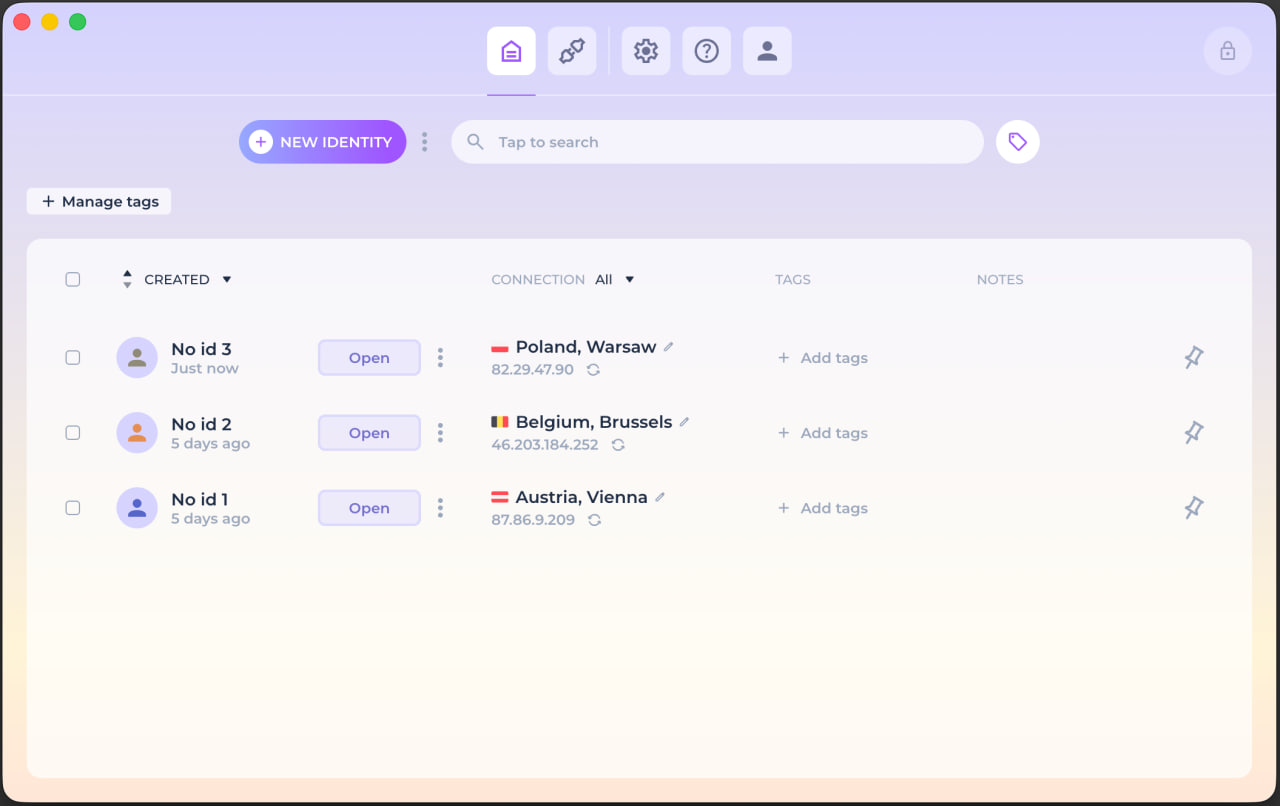
NOID solves a narrower and more useful task: it creates separate browser environments for different work contexts. Each identity has its own cookies, local storage, fingerprint parameters, and connection context. This does not turn you into "a different person." It reduces the mixing of traces between roles.
The limits matter. NOID does not override platform rules: if a service forbids a specific use case, browser isolation does not make it allowed. It also does not replace sane network setup. A poor proxy or a strange combination of IP, language, and timezone still creates risk.
NOID is not needed for everything. If you just read news and want fewer ads, Firefox, Brave, or Safari with solid settings may be enough. NOID is useful when a regular browser is too broad and a classic antidetect browser is too heavy.
The test is simple: create two identities, open Check ID in each, and compare visible parameters. Do not look at one field. Look at the whole set: IP, language, timezone, WebGL, screen, cookies, and local storage.
How to choose without self-deception
Choose a classic antidetect browser if:
you have many profiles and a team;
you need roles, APIs, bulk operations, and templates;
you understand how to keep fingerprint, proxy, and profile behavior consistent;
the tool's cost is justified by your workflow.
Choose NOID if:
you need to separate personal and work online contexts;
you do not want to manually configure dozens of fingerprint parameters;
local data, a clear interface, and fast setup of separate environments matter;
you want to check the browser environment with facts, not believe slogans about anonymity.
Choose a regular privacy browser if:
the task is only ad and tracker blocking;
you do not need to separate accounts and work roles;
you do not work with different network contexts;
site compatibility matters more than separate environments.
If you are unsure, do not start with the tool. Start with the layer you need to separate: local history, network route, browser fingerprint, or work accounts. These are different layers. The boundary between network and browser layers is explained in the difference between a secure browser and a VPN.
Try NOID free
If this sounds like your situation, try NOID free for 7 days. No credit card is required.
Create one identity for personal browsing and one for work, then open Check ID in both and compare what sites see.
Popular Questions
- 01A classic antidetect browser usually gives maximum control: manual fingerprint parameters, proxies, APIs, teams, and bulk actions. NOID focuses on a simpler scenario: separate identities for work contexts without dozens of manual settings.
- 02Teams and specialists who need hundreds of profiles, roles, APIs, templates, export, and a complex operating workflow. If that is your process, a simpler browser may be too limited.
- 03No. NOID separates browser environments and reduces trace mixing, but it does not override platform rules, account history, user behavior, or connection quality. No honest tool can promise that an account will always be fine.
- 04Sometimes, if the task is only convenience. Chrome profiles do not give full control over browser fingerprint or network context. They can be enough for personal mail and a work dashboard; they are not enough for stricter environment separation.
- 05It depends on the task. A VPN or proxy changes the network route and visible IP address, but it does not manage the browser fingerprint. NOID works on the browser layer. The network layer still needs to be configured carefully.
- 06Because anonymity is not created by one button. A site can see the account, behavior, IP, cookies, local storage, browser fingerprint, and how consistent those signals are. A good tool helps separate environments, but it does not erase the rest of reality.